
UPDATE NOMINEE | AXIS BANK | 2025
Designing a multi-nominee experience without multiplying friction
A regulatory change increased Fixed Deposit nominations from one to up to four. I redesigned the experience around reusable customer information rather than repeated forms, creating a core nominee-management pattern later extended across 6 Axis product areas.
~30M
Retail Mobile
BankingCustomers
1 → 4
Nominees per FD
20
Users tested
6
Product areas

TEAM
Product Manager
Engineering
Compliance/Legal
Product Owners + designers
from 5 other product areas
MY ROLE
Problem framing
User research
Conceptualization & UX
UX Copy
Prototyping & testing
Pattern documentation
Dev handoff
DURATION
2 weeks
2 iterations
Brief → research
→ V1 → testing
→ V2 → final handoff

The trigger

One nominee became four. The complexity multiplied with it.
A 2025 regulatory change allowed customers to nominate up to four people for a Fixed Deposit, instead of one.
It also introduced two ways to distribute the deposit: Priority, where nominees are ordered by precedence, and Percentage, where the deposit is split between them.

What looked like a simple “add three more nominees” requirement actually introduced more people, more information, and a new financial decision into the journey.

The Design Question

How do you collect 3–4x more nominee data without creating 3–4x more friction?
The existing journey was designed for one nominee. The new requirement added up to three more people, each with their own information, plus allocation decisions that didn't exist before.
The goal wasn't to make a longer form easier to fill.
It was to make the additional complexity feel manageable.


What existed before

The existing flow handled one nominee at a time.
During FD creation, the nominee field surfaced the default nominee already linked to the customer's account.
Tapping it opened three choices:
keep the existing nominee, enter a new nominee, or proceed without a nominee.
Choosing Enter new nominee expanded an inline form within the same bottom sheet to collect the nominee's name, relationship, current address and date of birth. For a minor nominee, guardian details were also required.
01 - Existing Nominee
Default nominee already associated
with the account


02 - New Nominee
Inline form appears within
the same flow

The model was simple: one FD → one nominee → one set of nominee details.
There was no way to manage multiple nominees or define how the deposit should be distributed between them.
First models

I established the management layer first, then explored how customers would add nominees and allocate the deposit.
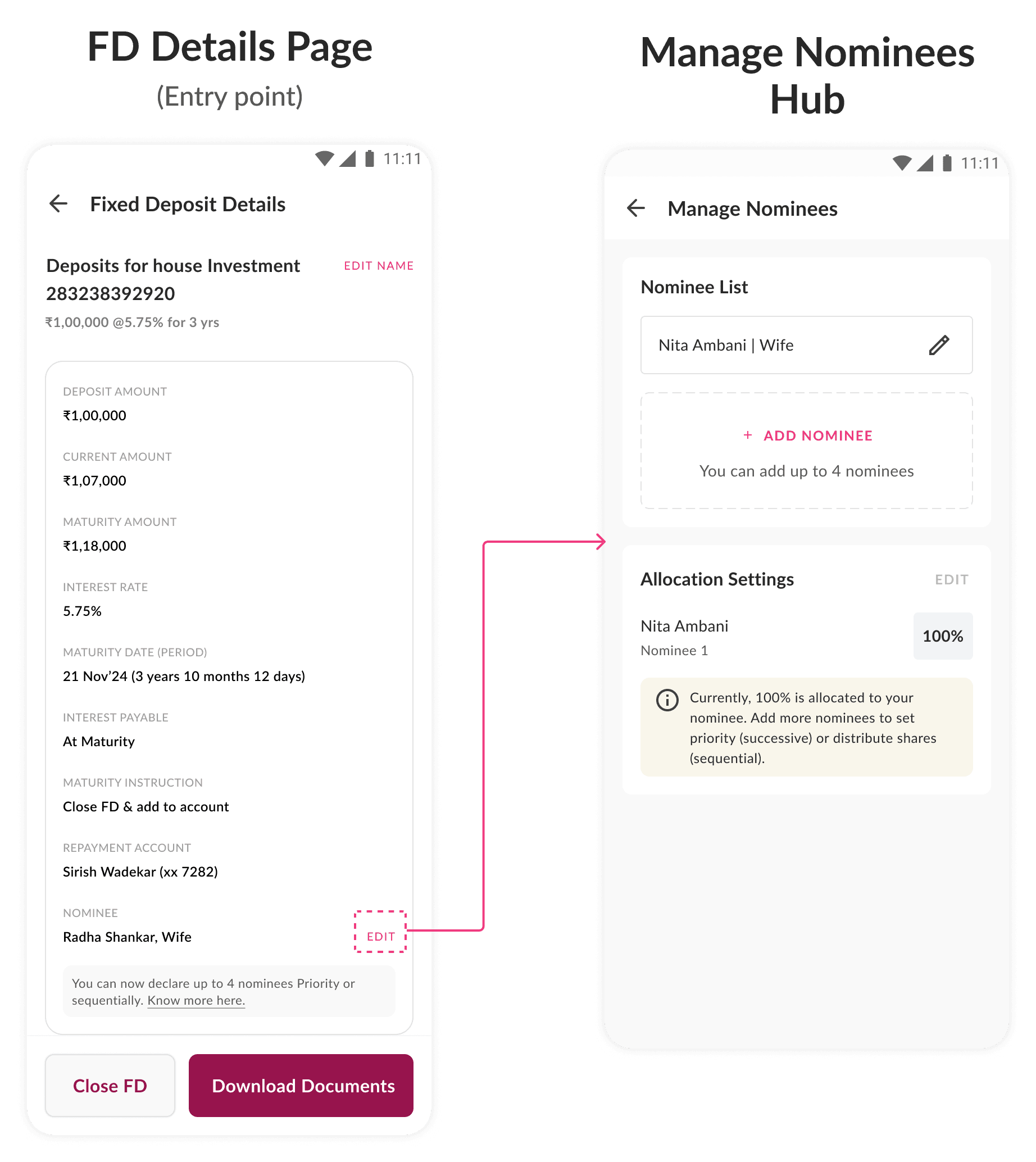
01 · MANAGE NOMINEES
A central place to manage the nominee state
Since customers could now have multiple nominees and would need to add, edit or remove them over time - I introduced a dedicated Manage Nominees hub as the place to access those actions.
02 · ADD NOMINEES
Two ways to handle multiple nominee entry
Since customers could now have multiple nominees and would need to add, edit or remove them over time - I introduced a dedicated Manage Nominees hub as the place to access those actions.


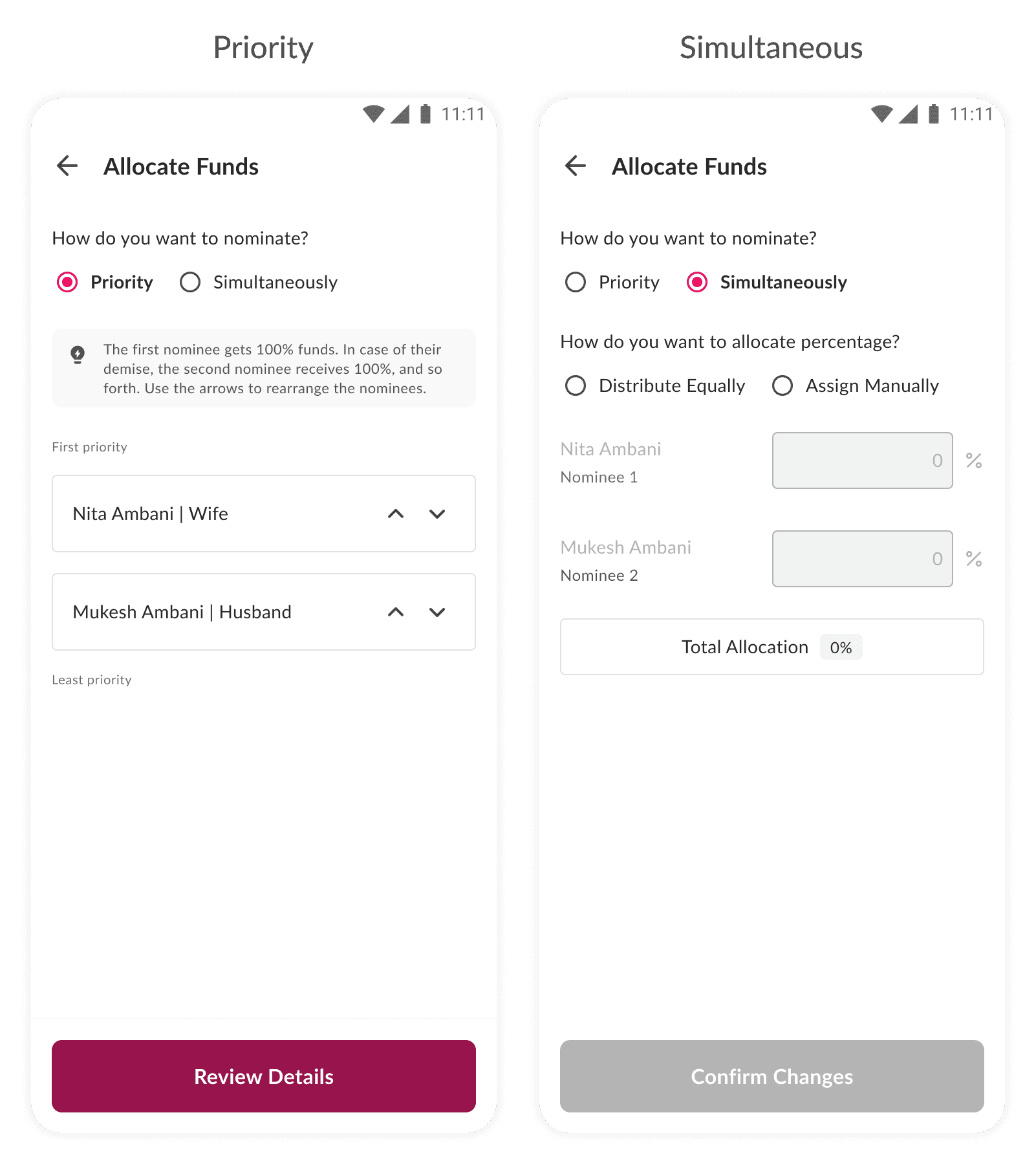
03 · ALLOCATION
A separate decision after nominee entry
Once the nominee set is complete, the customer decides how the deposit should be distributed between them.
What I tested
WHAT I TESTED
Who, method, objective.
I tested the first model before committing to it.
I ran scenario-based prototype testing with 20 Retail Mobile Banking FD users — 15 existing customers and 5 Axis employees — using think-aloud to observe how they navigated the nominee journey.
20 participants
15 customers · 5 employees
Scenario-based testing
Realistic FD nomination scenario
Think-aloud
Observed decisions, confusion and workarounds
End-to-end ownership
Research → moderation → synthesis
Add nominee → Enter nominee details → Repeat for additional nominees → Assign addresses → Allocate deposit
The goal wasn't to validate a finished solution. It was to identify where the first model created friction.
B. WHAT WE FOUND
The structure held. The information collection didn't.

Manage Nominees
The hub itself was understood and supported the overall management task.

Nominee information collection
This is where repeated entry and state became problematic.
01 — Repetition
The same information kept being entered again.
Users frequently re-entered addresses instead of reusing information they'd already provided.
02 — The State
The growing nominee set became harder to track.
As more nominees were added, it became less obvious which nominees were complete and what still needed attention.
03 — Digital value
“Phone mein karne ka kya fayda?”
While completing the sequential forms, one middle-aged participant compared the experience to filling out multiple forms at a branch.
Digital was reproducing the paperwork instead of removing it.
The problem wasn't simply the amount of information. It was the repetition of information the bank could potentially help customers reuse.
The Reframe
Repetition was an information-model problem, not just an interaction problem.
The regulatory change applied across multiple Axis Bank products simultaneously. After designing the pattern for Retail Mobile Banking, I proactively reached out to product owners of other teams — Corporate Banking, Branch of the Future (BOTF), and other deposit journeys — and presented the pattern as a shared solution.
THE SYMPTOM
Users were repeatedly entering information they had already provided.
THE ROOT
The experience treated each nominee as an independent record, with their information repeated inside each form.
THE OPPORTUNITY
Separate information that is specific to a nominee from information that can be reused across nominees.

I didn't want to make repeated entry easier. I wanted to remove the need for repeated entry.
This shifted the problem from “How do we make four forms easier to complete?” to “What information should exist once, and what information should be reusable?”
The Options
Three ways to handle multiple nominees
#1 IMPROVE REUSE
Make the existing address-reuse checkbox more visible.
Pro: Minimal change to the existing flow
Trade-off: Repeated entry still remains
#2 IMPROVE PROGRESS
Make nominee state and progress clearer.
Pro: Easier to track completion
Trade-off: Repeated entry still remains
#3 CHANGE THE INFORMATION MODEL
Separate reusable information from nominee-specific information.
Pro: Removes the underlying repetition
Trade-off: Requires a deeper change to the existing model
The first two options improved the experience around the repetition. The third removed the source of it.
The chosen direction
We chose to change the information model, not optimise the repetition.
The first two approaches improved how users moved through the forms, but both still treated every nominee as a separate set of information.
The third approach addressed the root problem: separate information that belongs to the nominee from information that can be reused across nominees.

Reuse first
Existing nominee information becomes selectable rather than re-entered.
Share where possible
Addresses become reusable across nominees.
Decide separately
Allocation happens once the nominee set is complete.
This became the foundation for the new nominee experience.
Applying the model
Reuse first. Ask only for what's missing.
The new model turned nominee setup from repeated data entry into a combination of selection and lightweight entry. Existing nominees could be reused, while genuinely new nominees required only the information needed to create them.


What changed after testing
Research changed the model, not just the interface.
REPEATED ENTRY → REUSE
Existing nominee and address information became selectable and reusable.
FORM SEQUENCE → CLEAR STATE
The nominee set became easier to understand and manage as it grew.
REGULATORY LANGUAGE → CUSTOMER LANGUAGE
“Successive” became Priority and “Simultaneous” became Percentage with Compliance approval.
The biggest change was moving from repeated data entry to a reusable information model.
Impact
A regulatory requirement became a reusable product pattern across Axis.
6 PRODUCT AREAS
The core nominee-management model was extended beyond Retail Mobile Banking, with product-specific requirements layered onto the shared structure.
~30 MILLION
Retail Mobile Banking customer scale
20
Users involved in V1 testing
Less duplicated design & engineering effort
Teams could build on the existing nominee-management model instead of independently designing and implementing the same core interactions.
Consistent experience
Customers encounter the same underlying nominee-management logic across Axis products, even where product-specific requirements differ.
Faster implementation
Teams could reuse a pattern that had already been designed, reviewed and documented, rather than starting from zero.
The reusable core — nominee management, nominee reuse, shared addresses and allocation — became a common starting point across six product areas.
The implementation is still under development, so post-launch customer outcomes are not yet available. The next validation will focus on manual-entry reduction, completion time, address reuse and drop-off.
Where this could go next
Manage nominees once. Reuse them across the banking relationship.
The current pattern is scoped to individual products. A natural next step is a universal nominee layer where customers can manage nominees from one place, create reusable sets of people, and apply those sets across eligible products without selecting the same people again and again.

One source of nominee information, reused wherever it applies.
Still here? Let's make something ↓

What I'm looking for
(go on - tick all three)
hard problems with no rule-book
a team that sweats the craft
room to own the whole problem
P.S find me here ↓
samasaishreya@gmail.com
linkedin.com/in/shreya-sama/
Resume


Crafted with love & care ♥️
© 2026 Shreya Sama. All rights reserved.